

How Miro Helps Remote Teams Brainstorm, Plan, and Execute Better
Miro is the leading visual collaboration platform that empowers remote teams to brainstorm creatively, plan strategically, and execute projects efficiently with real-time collaboration on infinite boards. This guide explores how Miro transforms teamwork through sticky notes, voting tools, timers, mind maps, Kanbans, and pre-made templates for OKR planning, project kickoffs, and strategy sessions—all in one visual workspace that keeps everyone aligned.
Table of Contents
ToggleIntroduction
The way teams work together has altered as a result of remote work. Instead of gathering in conference rooms and standing around whiteboards, employees now connect from different cities, countries, and time zones.Teams often struggle with communication gaps, scattered information, and a lack of visibility into ongoing projects. This is where Miro has become a valuable tool for modern organizations.
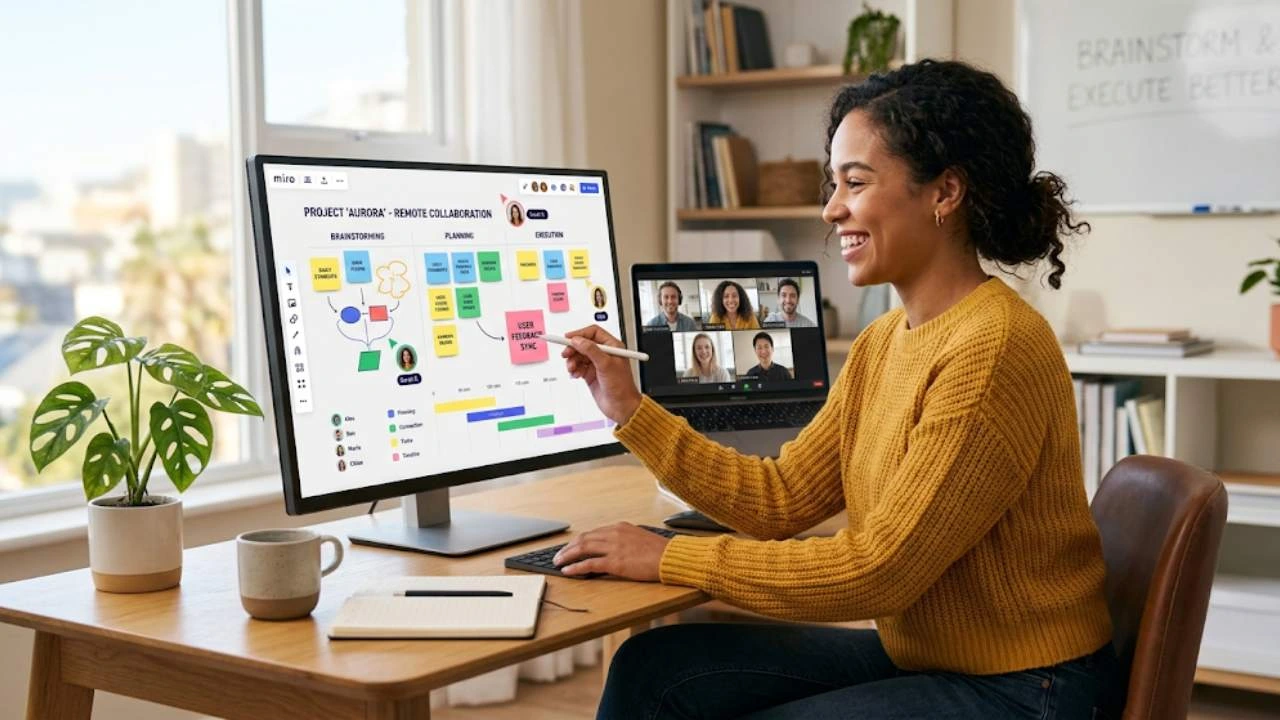
Miro is a visual collaboration platform designed to help teams brainstorm ideas, create plans, and execute projects efficiently. It provides a shared digital workspace where team members can collaborate in real time, regardless of location. By combining visual thinking, project planning, and collaborative workflows, Miro helps remote teams stay aligned and productive.
What Is Miro?
Miro is often described as an online whiteboard, but it has evolved into much more than that. It is a comprehensive collaboration platform that enables teams to work visually on a single infinite canvas. Users can add sticky notes, diagrams, images, documents, flowcharts, and project plans to create a shared workspace that everyone can access.
The platform supports a wide variety of use cases, including brainstorming sessions, product development, strategic planning, agile workflows, customer journey mapping, and team workshops. Instead of switching between multiple applications, teams can centralize their ideas and processes in one location. This makes collaboration smoother and reduces the risk of information getting lost. For remote teams, Miro acts like a virtual meeting room where everyone can contribute, discuss ideas, and track progress together.
Brainstorming Made Simple
One of Miro biggest strengths is its ability to support creative brainstorming. Traditional brainstorming often relies on physical whiteboards and sticky notes. Remote teams do not have access to those tools, which can make idea generation more difficult. Miro solves this problem by recreating the brainstorming experience digitally.
Team members can add notes, comments, images, and sketches to a shared board simultaneously. Everyone can contribute ideas in real time, making sessions more interactive and engaging. The platform’s infinite canvas allows teams to organize thoughts freely without worrying about space limitations.
Miro also provides pre-built brainstorming templates. Whether teams are conducting a SWOT analysis, mind-mapping exercise, or design-thinking workshop, they can start with a structured framework instead of a blank page. This helps participants focus on generating ideas rather than setting up the workspace. The visual nature of brainstorming in Miro makes it easier to identify patterns, connections, and opportunities that might otherwise be overlooked.
Key Features of Miro
1. What Is Miro?
Miro is often described as an online whiteboard, but it has evolved into much more than that. It is a comprehensive collaboration platform that enables teams to work visually on a single infinite canvas. Users can add sticky notes, diagrams, images, documents, flowcharts, and project plans to create a shared workspace that everyone can access.
The platform supports a wide variety of use cases, including brainstorming sessions, product development, strategic planning, agile workflows, customer journey mapping, and team workshops. Instead of switching between multiple applications, teams can centralize their ideas and processes in one location. This makes collaboration smoother and reduces the risk of information getting lost.
For remote teams, Miro acts like a virtual meeting room where everyone can contribute, discuss ideas, and track progress together.
Brainstorming Made Simple
One of Miro biggest strengths is its ability to support creative brainstorming. Traditional brainstorming often relies on physical whiteboards and sticky notes. Remote teams do not have access to those tools, which can make idea generation more difficult. Miro solves this problem by recreating the brainstorming experience digitally.
Team members can add notes, comments, images, and sketches to a shared board simultaneously. Everyone can contribute ideas in real time, making sessions more interactive and engaging. The platform’s infinite canvas allows teams to organize thoughts freely without worrying about space limitations.
Miro also provides pre-built brainstorming templates. Whether teams are conducting a SWOT analysis, mind-mapping exercise, or design-thinking workshop, they can start with a structured framework instead of a blank page. This helps participants focus on generating ideas rather than setting up the workspace.
The visual nature of brainstorming in Miro makes it easier to identify patterns, connections, and opportunities that might otherwise be overlooked.
Turning Ideas Into Actionable Plans
Generating ideas is only the first step. Successful teams need a way to transform those ideas into clear action plans. Miro helps bridge the gap between creativity and execution by offering planning and strategy tools.
Teams can create project roadmaps, Miro workflow diagrams, organizational charts, and strategic plans directly within the platform. Because everything remains on the same board, there is no need to transfer information between different tools. This preserves context and reduces confusion.
Visual planning is particularly useful because it allows stakeholders to see the entire project at a glance. Objectives, milestones, timelines, and dependencies become easier to understand. Instead of reading lengthy documents, team members can quickly interpret information through visual representations.
Miro’s templates also accelerate the planning process. Teams can use ready-made frameworks for sprint planning, project management, customer journey mapping, and product development.

Improving Project Execution
Planning alone does not guarantee success. Teams must execute effectively to achieve results. Miro supports project execution by improving visibility, communication, and collaboration throughout the project lifecycle.
Because all project information is stored in a shared workspace, team members can easily track progress and stay informed about updates. Everyone has access to the same information, reducing misunderstandings and eliminating unnecessary status meetings.
Cross-functional collaboration becomes easier as well. Product managers, Miro designers, marketers, engineers, and executives can work together within the same environment.
Why Ivacy VPN Is a Popular Choice for Online Privacy and Security
How T&S Clothing, LLC Is Redefining Modern Fashion and Apparel Solutions
Credy ES Review: Features, Benefits, and Loan Application Tips
Sixt ES: The Ultimate Guide to Boosting Your Digital Marketing Strategy in 2026
MENSITALY Review 2026: Is MENSITALY Worth Your Money?
AI Features That Enhance Productivity
Artificial intelligence is becoming an important part of workplace collaboration, and Miro has embraced this trend with a range of AI-powered features.
For example, AI can help summarize brainstorming sessions, organize ideas, and generate structured outputs from discussions. Instead of spending hours manually sorting information, teams can use AI assistance to accelerate the process.
Miro’s AI capabilities also support planning and documentation. Teams can quickly transform raw ideas into actionable frameworks, making it easier to move from brainstorming to execution. This not only saves time but also helps maintain momentum during projects.
By automating routine activities, AI allows team members to focus on strategic thinking, creativity, and problem-solving. As remote work continues to evolve, these capabilities are becoming increasingly valuable for distributed organizations.
Benefits of Using Miro for Remote Teams
Miro offers several key advantages for remote and hybrid teams:
Benefit | Description |
Improved Cooperation No matter where they are | teams may collaborate in real time. |
Visual Communication | Complex ideas become easier to understand through diagrams and visual layouts. |
Increased Engagement | Interactive boards encourage participation from all team members. |
Faster Planning | Templates and visual frameworks reduce preparation time. |
Improved Alignment | Everyone works from the same source of information. |
Enhanced Productivity | AI tools and integrations streamline workflows. |
These benefits make Miro an attractive option for organizations seeking to improve teamwork and efficiency.


Conclusion
Remote work requires more than video calls and messaging apps. Teams need a collaborative environment where ideas can be generated, organized, and executed effectively. Miro provides that environment through its visual collaboration platform.
From brainstorming sessions and project planning to workflow management and AI-powered productivity tools, Miro helps remote teams stay connected and aligned.
As businesses continue to embrace remote and hybrid work models, tools like Miro will play an increasingly important role in helping teams collaborate, innovate, and achieve their goals.
Frequently Asked Question
A. Miro is used for brainstorming, project planning, workflow mapping, team collaboration, and visual communication.
A. Yes, Miro is specifically designed to support collaboration among remote and distributed teams.
A. Yes, Miro provides a digital whiteboard experience with additional collaboration and planning features.
A. Yes, Miro includes hundreds of templates for brainstorming, project management, strategy planning, and workshops.
A. Miro improves productivity by centralizing information, supporting real-time collaboration, and providing AI-powered tools that automate repetitive tasks.
Related Post