

The Ultimate Guide to AKKO Mechanical Keyboards for Gamers and Professionals
AKKO builds stylish, high-performance mechanical keyboards that appeal to both gamers and professionals by combining responsive switches, robust build quality, and thoughtful ergonomics. This ultimate guide to AKKO keyboards covers key product lines, switch options (linear, tactile, clicky), hot-swappable layouts, compact form factors (60%, 65%, TKL), RGB and wireless features, and how to choose the right model for gaming, typing, or hybrid work.
Table of Contents
ToggleIntroduction
Akko mechanical keyboards have become a strong name in the world of typing and gaming gear, especially for users who want premium features without paying premium prices. Over the past few years, Akko has built a reputation for combining creative design, solid build quality, and enthusiast-level customization in a way that feels accessible to beginners as well as experienced keyboard users. Instead of focusing only on performance or only on looks, Akko tries to balance both, which is exactly why it has gained so much attention among gamers, programmers, writers, and office workers.
What makes Akko stand out immediately is the variety. You don’t just get a plain black keyboard—you get themed designs, colorful keycaps, different layouts, and multiple switch options. Whether someone wants a compact keyboard for gaming or a full-size setup for productivity, Akko offers something suitable. The brand has positioned itself as a bridge between budget keyboards and high-end custom mechanical builds, making it one of the most interesting options in the market today.
Why AKKO Mechanical Keyboards Are So Popular
One of the biggest reasons Akko keyboards are popular is the value they deliver. Many mechanical keyboards with similar features often cost significantly more, but Akko includes things like hot-swappable switches, PBT keycaps, RGB lighting, and wireless connectivity at relatively affordable prices. This gives users a taste of the custom keyboard world without requiring deep technical knowledge or expensive modifications.
Another major factor is design variety. Akko doesn’t follow the boring “black rectangle” approach. Instead, it creates keyboards with artistic themes, pastel color schemes, and unique visual styles. This makes them appealing not just as tools but also as desk setup pieces. Many users choose Akko simply because it enhances the look of their workspace.
There is also a strong community aspect. Enthusiasts often recommend Akko as a starting point for people entering the mechanical keyboard hobby. Since most Akko keyboards are hot-swappable, users can experiment with different switches easily, which makes learning about keyboard customization much simpler and more enjoyable.
Key Features of AKKO Mechanical Keyboards
Akko keyboards come with a wide range of features that make them competitive in the mechanical keyboard market. One of the most important is hot-swap support, which allows users to replace switches without soldering. This means you can change typing feel anytime without needing technical skills.
Another important feature is multi-mode connectivity. Many Akko keyboards support wired USB-C, Bluetooth, and 2.4GHz wireless connections. This makes them suitable for different devices like laptops, desktops, and tablets. Switching between devices is smooth and convenient, especially for people who multitask.
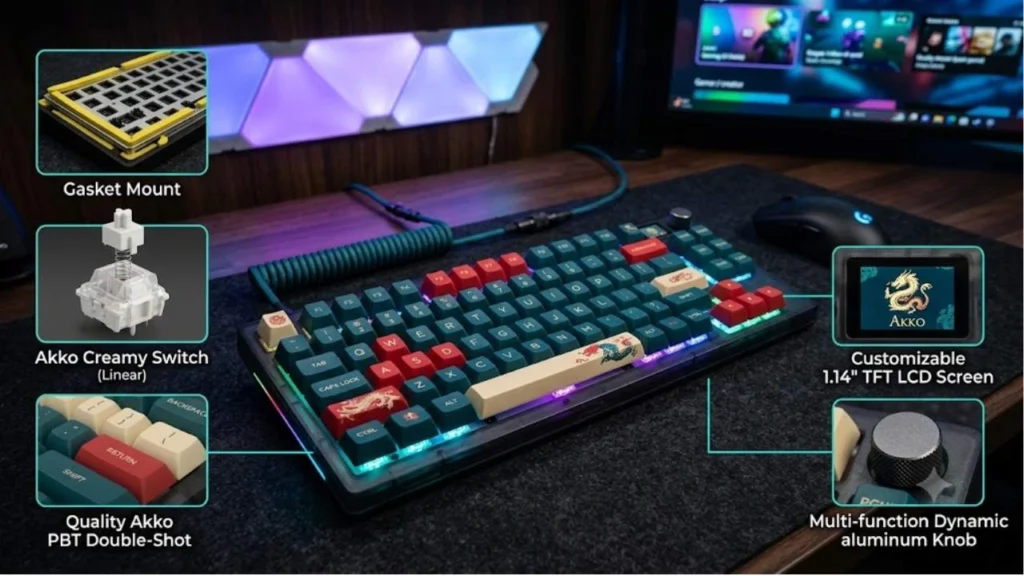
Akko also focuses heavily on PBT keycaps, which are more durable than standard ABS keycaps. They resist shine and wear over time, keeping the keyboard looking new even after long use. Combined with RGB lighting, these keyboards offer both durability and style.
Other common features include:
- N-key rollover for accurate key detection during gaming
- Macro support for productivity tasks
- Pre-lubed switches in some models for smoother typing
- Internal foam layers for improved sound quality
Switch Experience and Typing Feel
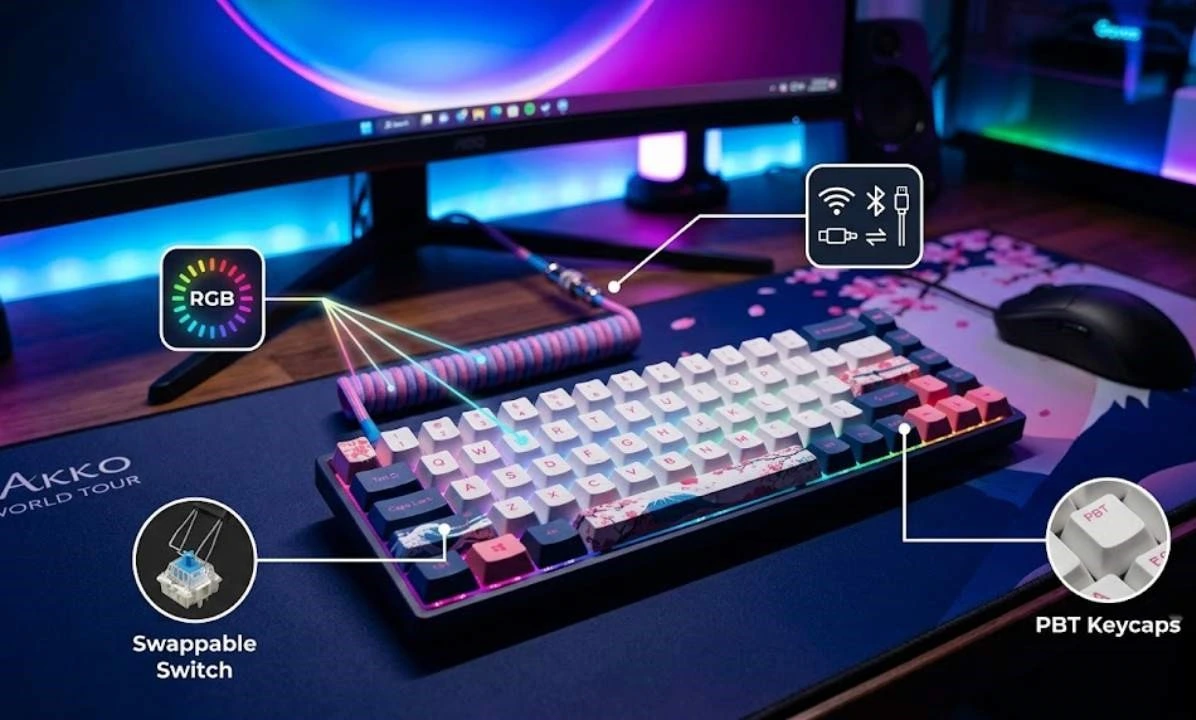
Switches play a huge role in how a mechanical keyboard feels, and Akko has developed its own CS (Custom Switch) series to give users more choice. These switches come in linear, tactile, and silent versions, allowing users to pick based on preference.
Linear switches are perfect for gaming because they are quick and smooth. Tactile switches provide a small bump that helps with typing accuracy, which many writers and programmers prefer. Silent switches reduce noise, making them suitable for office environments.
The typing experience on Akko keyboards is generally smooth and satisfying. Many models come pre-lubed or lightly tuned from the factory, which reduces scratchiness and improves consistency. While high-end custom keyboards may still feel slightly more refined, Akko offers a surprisingly close experience at a much lower cost.
For gamers, fast linear switches are especially popular because they reduce actuation resistance and improve response time in fast-paced games like FPS or MOBA titles.
Popular AKKO Keyboard Models
Akko offers several models designed for different types of users. Some of the most popular include:
The Akko 3068B is a compact 65% keyboard that saves desk space and is ideal for gaming setups. It removes the number pad and extra keys, focusing only on essentials.
The Akko 5075B Plus is a 75% layout keyboard that balances compact size and functionality. It is one of the most recommended models for both work and gaming due to its versatility and wireless support.
The Akko 3098B is a near full-size layout (96%) that includes a number pad but still saves space compared to traditional full keyboards. It is great for office users who need full functionality.
Each of these models offers similar core features but targets different usage needs, making it easier for users to choose based on their workflow.
Gaming and Productivity Performance
When it comes to gaming, Akko keyboards perform very well for most users. They offer low input latency, especially in wired and 2.4GHz wireless modes. The keys register quickly, and the N-key rollover ensures that multiple key presses are detected accurately, which is important in competitive gaming.
For professional use, Akko keyboards also shine. Writers, developers, and office workers benefit from the comfortable typing experience and ergonomic key profiles. Long typing sessions feel less tiring due to well-designed keycaps and stable switch feel.
However, it is worth noting that ultra-competitive esports players may prefer specialized low-latency gaming keyboards. Still, for 90% of users, Akko delivers more than enough performance for both gaming and productivity.

Design, Build Quality, and Sound
Akko places a strong emphasis on aesthetics. Many keyboards feature themed keycap sets, pastel tones, or artistic designs inspired by culture and nature. This makes them visually appealing compared to traditional keyboards.
In terms of build quality, Akko keyboards are solid and stable. Many models include internal dampening foam, which reduces hollow sound and improves typing acoustics. The result is a more satisfying “thocky” or soft typing sound depending on the switch type.
AKKO vs Other Keyboard Brands
When comparing Akko to brands like Keychron, Logitech, and Razer, each has its strengths.
Brand | Strengths | Weaknesses |
Akko | Design variety, customization, value | Software limitations |
Keychron | Mac support, productivity focus | Less creative design |
Logitech | Reliability, ecosystem integration | Expensive, less customizable |
Razer | Gaming ecosystem, RGB effects | Higher price, limited modding |
Akko stands out mainly because it gives users customization and enthusiast features at a lower price point. However, its software and long-term ecosystem support are not as strong as some competitors.
Pros and Cons of AKKO Mechanical Keyboards
Pros:
Akko keyboards offer excellent value for money, especially considering the features included. They are highly customizable, visually appealing, and suitable for both gaming and professional use. The hot-swap feature makes them beginner-friendly for people entering the mechanical keyboard hobby.
Cons:
The software experience can feel limited, especially for advanced users. Some switch batches may feel slightly inconsistent, and macOS support is not as strong as Windows. Despite these issues, the overall experience remains very positive for most users.

Conclusion
Akko mechanical keyboards successfully combine style, performance, and affordability in a way that few brands manage to achieve. They are ideal for users who want more than just a basic keyboard but are not ready to spend heavily on custom builds. Whether you are gaming, working, or typing long documents, Akko provides a balanced and enjoyable experience that fits a wide range of needs.
Frequently Asked Question
A. Yes, they offer fast response times, low latency modes, and smooth switches suitable for most gaming genres.
A. Most Akko keyboards are hot-swappable, so you can easily change switches without soldering.
A. Yes, they work with both, but software features are better supported on Windows.
A. Akko focuses on design variety, customization, and value, making it more enthusiast-friendly at lower prices.
A. Yes, they remain one of the best options for users who want premium features at an affordable price.
Related Post